
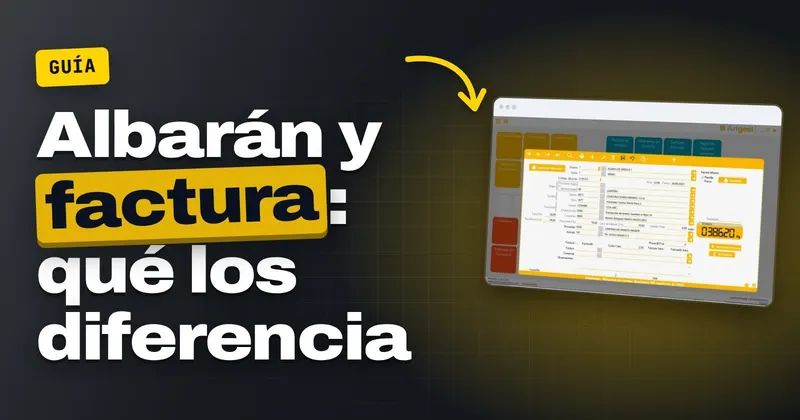
Month-end: on the admin desk sit all the delivery notes for a construction-site customer, trip by trip, and they have to be turned into one invoice that adds up. If you are wondering whether a delivery note and an invoice are the same thing, the short answer is no. The delivery note records what material left the weighbridge, how much it weighed and which site it went to, while the invoice is the document you use to charge for that material and which is stored in your invoicing software. Below you will find the differences in a table, the steps to invoice the month's delivery notes and the errors that make the customer call because the figures don't add up.
Is a delivery note the same as an invoice at a quarry?
The delivery note is born at the weighbridge. Each lorry is weighed empty and loaded, and subtracting the tare from the gross weight gives the net weight. That net weight is recorded on the delivery note along with the material, the customer, the site, the registration number and the driver. It is the paper that travels with the load and proves the delivery.
The invoice comes when it is time to get paid. It can cover a single delivery note, as in a cash sale at the weighbridge itself, or all of a construction-site customer's delivery notes for the month. It carries prices, taxes and the total, and it is issued from the invoicing computer system, which is the software that has to comply with the Veri*Factu regulation.
That regulation is Real Decreto 1007/2023 (the Spanish royal decree governing invoicing software), with the deadlines set by Real Decreto-ley 15/2025 (published in the BOE, Spain's Official State Gazette, on 03/12/2025). Companies have until 01/01/2027 to have their software adapted and everyone else, such as self-employed people subject to personal income tax (IRPF), until 01/07/2027. The tax authority (Hacienda) announced on 05/10/2026 that it wants to postpone this until October 2028, but its information note does not yet have a corresponding rule in the BOE.
What distinguishes a delivery note from an invoice when selling aggregates
This table summarises what sets the two documents apart when you sell aggregates. It is useful for explaining it to anyone new to the weighbridge or the office.
| What to look at | Delivery note | Invoice |
|---|---|---|
| Purpose | Proves the material was delivered | Charges for the material delivered |
| When it is made | At the weighbridge, on every trip | On a cash sale or at the end of the period agreed with the customer |
| Main details | Tare, gross weight, net weight, material, customer, site, lorry and driver | Customer's tax details, items, prices, taxes and total |
| How many there are | One per trip | One invoice can group one or many delivery notes |
| Price | May be priced or unpriced | Always shows the amount |
| Where it is kept | In the plant's delivery note register | In the software's invoicing register |
If you don't want to show a construction-site customer the rate on every trip, the delivery note goes out unpriced and the price appears only on the invoice. You can find it explained with examples in the guide to the priced delivery note, and the details worth capturing on each trip in the article on what details an aggregates delivery note should include.
When to invoice with delivery notes and when without
There are two ways to get to the invoice, and a quarry can use both.
- With delivery notes: the construction-site customer who loads every day receives, at the end of the period, an invoice that groups all their delivery notes. It is the approach that creates the most office work, because every delivery note has to be right before invoicing.
- Without delivery notes: the cash sale at the weighbridge, paid on the spot with its simplified invoice, or an item that doesn't go through the weighbridge, such as a one-off haulage charge. You can find cash sales step by step in cash sales at the quarry.
What matters is that the software supports both approaches without forcing you to invent a delivery note to invoice something that hasn't been weighed.
How to invoice the month's delivery notes step by step
1. Have all the month's delivery notes in the office
Before invoicing, check that the last trip of the month has already been recorded. If the weighbridge is at the plant and the office is elsewhere, the plant's delivery notes are imported into the office, or you work with the plant and office synchronised. Either way, check that the last day isn't missing.
2. Pull the outstanding delivery notes by customer and by site
A list of uninvoiced delivery notes, sorted by customer and then by site, lets you see at a glance what is missing. If a customer has several sites, decide with them whether they want one invoice per site or a single one covering everything.
3. Check prices and rates
See whether the price of crushed stone sub-base or gravel for that site changed mid-month. An unpriced delivery note is invoiced at the rate in force: if the rate is wrong in the software, it will be wrong on every line.
4. Review haulage
Separate the trips made with your own lorry, those made by a tipper from another company and those collected by the customer. How to charge for each case is covered in own and third-party haulage on the aggregates invoice.
5. Generate the invoice by grouping the delivery notes
Select the customer's delivery notes and create the invoice from them. Each invoiced delivery note must be marked so that it doesn't appear again next month.
6. Send it with the list of delivery notes
Send the invoice together with the list of delivery notes it includes: number, date, registration number, material and net weight. It is what your customer compares with what their site manager signed for.
7. Link the payment to the invoice
When the transfer arrives, record it against its invoice. That way you know which customer owes what without opening the bank in another window.
If at your quarry the weighbridge operator writes the weight down by hand and it is typed in again in the office to invoice, Arigest reads the weight from the weighbridge, generates the delivery note and invoices from those delivery notes: ask for a demonstration with your own materials and sites.
What to have ready before month-end
- Each customer's tax details checked, especially the tax ID (NIF) and the name.
- Sites registered with their rate and address.
- The invoice series you will use for each type of sale.
- Cancelled or duplicated delivery notes already reviewed and marked.
- The weighbridge verified. Non-automatic ones are verified every two years, the owner requests verification electronically at least one month before it expires and, without it, it cannot be used for commercial transactions (Orden ICT/155/2020, the Spanish order on metrological control of measuring instruments, amended by Orden ITU/1475/2024).
Errors that make the invoice not match the delivery notes
These are the ones that creep in between the weighbridge and the office:
- Weights typed twice: the weighbridge operator copies the net weight by hand and it is written again in the office. One changed digit is enough for the customer to complain.
- A delivery note invoiced on two invoices, or one left out because it reached the office late.
- A rate changed mid-month that wasn't updated in the software.
- A wrong tax ID or customer name: an invoice already issued cannot be altered, so a corrective invoice has to be issued.
- Invoicing the haulier's company for something that should have gone to the site customer, or the other way round.
How it works in Arigest from weight to invoice
In Arigest the delivery note is filled in with the weight it reads from the weighbridge through the RS-232 serial port (it is designed for the Sorribes S-400 in continuous output). Tare, gross weight and net weight go straight onto the delivery note along with the customer, the site, the lorry, the haulier and the material. It is explained on the weighbridge page.
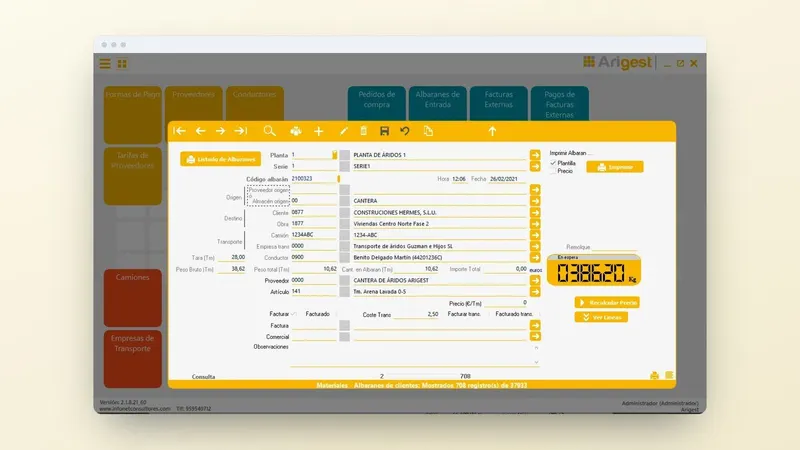
With the delivery notes generated, you issue invoices with or without delivery notes, produce customised lists of what is outstanding and link bank movements to each invoice. The invoicing complies with article 29.2.j of Ley 58/2003, General Tributaria (Spain's General Tax Act), and the RRSIF (the Spanish regulation on invoicing systems). All of this is on the page for the delivery note and invoicing software.
If you load tippers belonging to self-employed hauliers or other companies, that same delivery note also has to be linked to the electronic control document, mandatory since 05/10/2026 for public road freight transport. How the DeCA with its QR code is produced from the Arigest delivery note is explained on the DeCA page for quarries and aggregates.
What to do at this month-end
- Pull today the list of uninvoiced delivery notes by customer and site, and look for duplicates and missing ones.
- Check rates, tax IDs and haulage before generating any invoice.
- Count how many times the same weight is typed between the weighbridge and the invoice: that is the work you can save.
If you want to see how to go from the weighbridge ticket to the construction-site customer's invoice without retyping anything, request information or a demonstration of Arigest, call +34 959 54 07 12 or message us on WhatsApp at +34 621 39 39 47.