The cash customer is the one who creates the most work per euro invoiced. They turn up without an appointment, want a small amount of material, sometimes don't know exactly what they need, and pay on the spot, in cash or by card. If the process isn't clear, you end up with till discrepancies, delivery notes that were never paid and payments with no delivery note. This article proposes a simple procedure for the weighbridge and reviews the cash and invoicing rules worth keeping in mind.
Where errors usually creep in
- Undefined price: whoever is on the weighbridge applies a price from memory, which differs depending on the day or the person.
- Estimated weight: on small loads the weight is "eyeballed" or charged by shovelfuls instead of being weighed.
- Payment detached from the delivery note: the money goes into the till, but the delivery note doesn't show it as paid, or the other way round.
- Regular customers treated as cash customers and cash customers who take material "on account".
- Change and rounding that nobody records and that adds up by the end of the month.
- A till that is reconciled at the end of the week, when nobody remembers what happened in the first few days.
A procedure at the weighbridge
- Identify the customer. If they are a regular with an account, they are not a cash customer. If they are new, decide whether they are a private individual or a company and whether they will want an invoice with their details.
- Agree the product and price before loading. With a clear, visible cash price list, there is no haggling at the window.
- Weigh the tare of the empty vehicle on the way in.
- Load and weigh the gross weight on the way out, once the reading has settled.
- Issue the priced delivery note: product, net weight, price, amount and payment method.
- Take payment before the vehicle leaves and record it against that same delivery note.
- Hand over the proof of purchase: the delivery note and, where applicable, the invoice or simplified invoice.
The key is that the payment stays linked to the delivery note. That way, at the end of the day, the till is reconciled by comparing payments with delivery notes, not with the memory of whoever was on the weighbridge.
The cash payment limit
Article 7 of Ley 7/2012 (the Spanish law on measures to prevent tax fraud), in its current wording, prohibits paying in cash for transactions in which one of the parties acts as a business or professional where the amount is equal to or greater than 1,000 euros. As the quarry always acts as a business, the limit applies to all your sales, including those to private individuals. The amount rises to 10,000 euros when the payer is an individual with no tax residence in Spain who is not acting as a business or professional.
Two practical points from the same article:
- All the payments into which a delivery has been split are added together to calculate the limit. Splitting a sale across several delivery notes to pay each one in cash does not get around the limit.
- You must keep the proof of payment for payments that cannot be made in cash for five years.
The law itself sets out a penalty regime. If you have doubts about a specific case, see the information from the Agencia Tributaria on cash payments (the Spanish tax authority).
A useful internal rule: above a certain amount, card or bank transfer only. Setting it below the legal limit gives you some leeway if a customer comes back the same day for another load for the same job.
Full invoice or simplified invoice
The Reglamento de facturación (Real Decreto 1619/2012) (the Spanish invoicing regulations) allows, in its article 4, a simplified invoice to be issued, with fewer details than a full one, where the amount does not exceed 400 euros, VAT included, among other cases. But if the customer is a company or a professional and needs to deduct the VAT, they will ask for a full invoice with their details and tax ID (NIF). Ask before issuing it, so you don't have to correct it afterwards.
Remember that the software you invoice with has to meet the requirements for invoicing systems under the Ley General Tributaria (the Spanish General Tax Law); check the current deadlines with the Agencia Tributaria.
The daily till reconciliation
Reconciling every day takes a few minutes and saves you hours of hunting for a mistake made two weeks ago. A simple outline:
| Item | How it is checked |
|---|---|
| Opening cash float | Counted on opening and noted down |
| Cash payments | Total of cash delivery notes paid in cash |
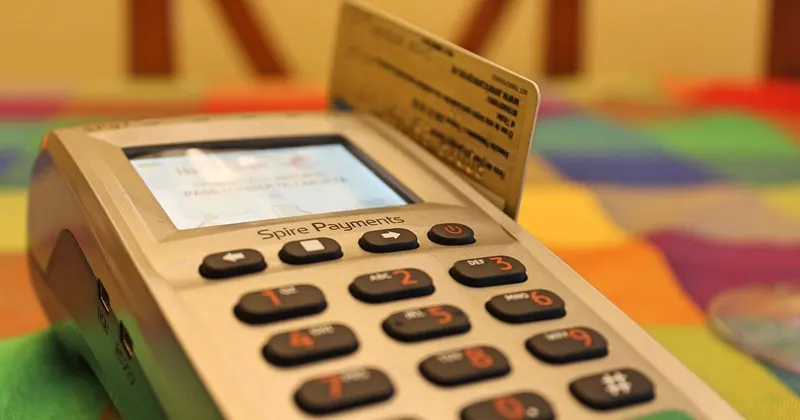
| Card payments | Card terminal closing report against delivery notes paid by card |
| Cash withdrawals | Proof of each payment made from the till |
| Closing cash | Float + cash payments − withdrawals; it must match the amount counted |
| Outstanding cash delivery notes | There should be none; if there are, each one is explained |
If something doesn't add up, check it that same day: a cancelled delivery note, a payment recorded with a different payment method or a load that left without going through the till.
Mistakes worth avoiding
- Cancelling cash delivery notes without recording the reason.
- Giving credit to a cash customer "just this once" without opening an account for them.
- Using the same till for payments in and for small payments out without proof.
- Taking cash payments equal to or above the legal limit, or splitting them.
- Not separating cash sales from sales to account customers in your reports.
How Arigest handles it
In Arigest the delivery note is issued with the weight read directly from the weighbridge, so the quantity you charge for is the quantity that was weighed, with no typing. The delivery note records the customer, the item and the price, and you can see how it works under weighbridge connection.
Arigest manages payment methods and the recording of payments, and links bank movements to invoicing, which helps you reconcile what has been collected with what has been sold. Invoices are issued with or without delivery notes involved, and the invoicing system complies with article 29.2.j of Ley 58/2003 (the Spanish General Tax Law) and the RRSIF (the Spanish regulation on invoicing systems). You can find it under delivery notes and invoicing and in the frequently asked questions.