The first tipper truck arrives at seven in the morning, is weighed, loaded with crushed stone and leaves with its delivery note. At the end of the month, that weight has to end up on an invoice that the construction client accepts without calling you. If you are looking for quarry software in 2026, this is what it has to solve: reading the weight, producing the delivery note, invoicing, reconciling the bank and managing the fleet and costs. Below you will find each step, what to check at the weighbridge and what is worth verifying before you choose.
What quarry software needs to do in 2026
Split the quarry's work into areas and you will quickly see where hours are slipping away. Each row shows what the software should control and where things go wrong when it is done by hand.
| Area | What it controls | Where it goes wrong |
|---|---|---|
| Weighbridge and delivery notes | Tare, gross weight, net weight, material, client and site | The weight jotted down by hand and typed in again at the office |
| Invoicing | Invoices generated from delivery notes or issued individually | Delivery notes missing or duplicated at month end |
| Payments and bank | Bank transactions linked to each invoice | Payments not matched to their invoice |
| Fleet | Vehicles, spare parts, fuel consumption, incidents and haulage | Lorry expenses on loose spreadsheets |
| Analysis | Sales and costs by client, site or material | Prices set without knowing what each sale earns |
How to go from the weighbridge reading to the delivery note without typing
Every tonne you sell starts on the weighbridge display. The less that number is touched between the display and the invoice, the fewer arguments you will have with the client.
- The lorry arrives empty and the tare is recorded.
- It is loaded under the hopper or with the loader and weighed again: gross weight.
- The net weight is worked out automatically, by subtracting the tare from the gross.
- The weighbridge operator selects the client, site, lorry, driver and material.
- The delivery note is printed and the driver takes their copy.
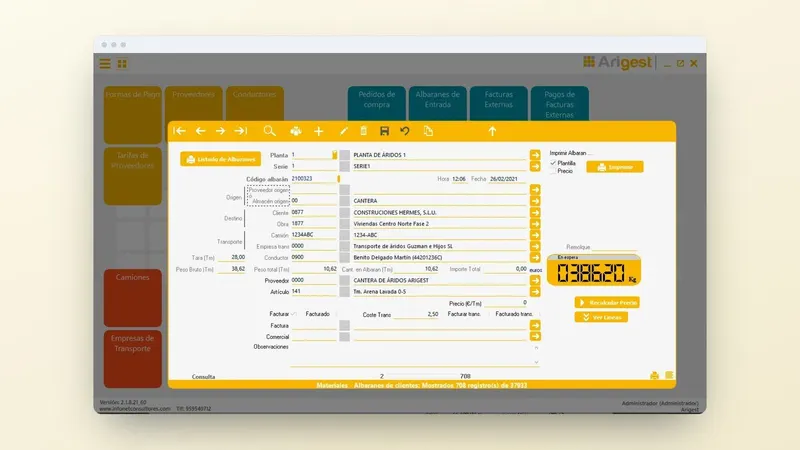
Arigest reads the weight through the RS-232 serial port (it is designed for the Sorribes S-400) and passes the tare, gross weight and net weight to the delivery note, which is generated automatically. You can see it in Arigest's weighbridge connection, and the cabling in how to connect a weighbridge to a computer via RS-232.
When the office is not next to the weighbridge
Arigest has four ways of working with the weighbridge, depending on where the invoicing office is: direct reading at the plant, a background capture module, import of the plant's delivery notes into the office, and plant and office kept in sync. You choose the one that suits your set-up and the delivery note reaches the office without being typed in again.
If at your quarry the weighbridge operator still writes down the weight to pass it on to the office later, request a demo and see how the Arigest delivery note comes straight from the weighbridge weight.
The verified weighbridge: how often and who requests it
An automatic delivery note is only as good as the weight behind it. Under Orden ICT/155/2020 (Spanish ministerial order on the metrological control of measuring instruments), as amended by Orden ITU/1475/2024, non-automatic weighing instruments must be verified every two years. The owner requests the verification electronically, at least one month before it expires.
Once the deadline has passed, the weighbridge cannot be used for commercial transactions until it passes verification: at a quarry, that means being unable to sell by weight. Check the label today, note the date in the office calendar and book the appointment with time to spare.
Invoicing with or without delivery notes and reconciling the bank
You invoice the construction client by grouping the month's delivery notes; the one-off customer gets a single invoice. You need both methods in the same software. Arigest issues invoices with or without delivery notes, and its invoicing complies with article 29.2.j of Ley 58/2003, General Tributaria (Spain's General Tax Act) and the RRSIF (Spanish regulation on invoicing software systems).
Bank transactions are linked to invoicing, so when you review the bank you know which invoice has been paid and which has not. For the invoice to add up, the delivery note has to come out complete from the weighbridge: review the details an aggregates delivery note must include and the process in delivery notes and invoicing.
Your own lorries and third-party trucks on every load
With your own lorries, what matters is knowing what each one costs you. In Arigest you manage vehicles, spare parts, fuel consumption, incidents and haulage in the same software as your delivery notes. To decide how to charge for transport, see own and third-party haulage on the aggregates invoice.
When the truck belongs to a self-employed driver or another company, the journey is public road haulage and, from 05/10/2026, it must carry its electronic control document. What that document requires is explained in DeCA for quarries and aggregates, which states that Arigest is integrated and that the delivery note you already produce is the one published with its QR code.
Sales and costs compared to set prices
With delivery notes and expenses in the same place, you get custom reports and comparative charts of sales, costs and invoicing by client, site or material. That is where you see which grade sells most, which site is behind on payment or which lorry spends too much on spare parts.
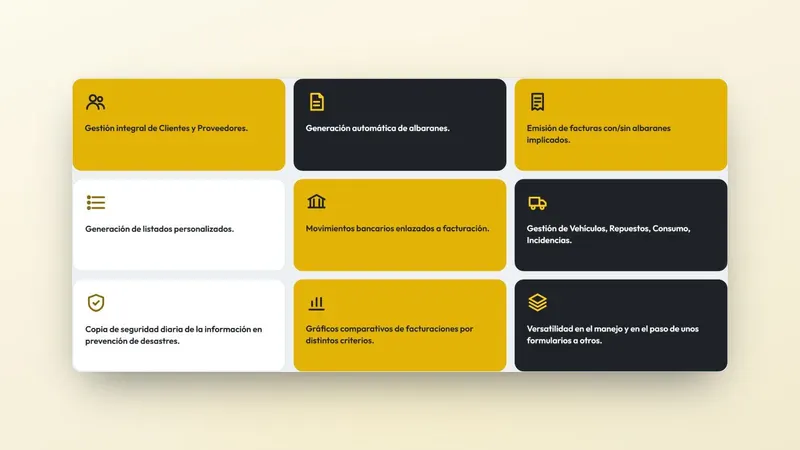
The next step is to work out which clients and materials give you the best margin. And so that you do not lose any of it, Arigest makes a daily backup.
What to check before choosing software for your quarry
Before asking for quotes, take this list with you and tick it off during the demo. If any of these points fails, the software does not fit your weighbridge or your office:
- The weight goes from the display to the delivery note through the serial port, without typing it in.
- There is a way to work with the office far from the plant.
- It invoices by grouping the month's delivery notes and also with individual invoices.
- Bank payments are linked to each invoice.
- Lorries, spare parts, fuel consumption and haulage are in the same software.
- Data is backed up every day.
What to do now at your quarry
- Follow one delivery note from the weighbridge to payment and count how many times the same weight is written.
- Look at the weighbridge's verification label and, if it expires soon, book the appointment now.
- In your client list, separate who loads with their own lorry and who uses trucks from self-employed drivers or other companies.
With that in hand, request information or a demo of Arigest and you will see your weighbridge, delivery note and invoice journey in a single piece of software. You can also call +34 959 54 07 12 or write on WhatsApp to +34 621 39 39 47.