
Software for the quarry's truck weighbridge: from weight to delivery note
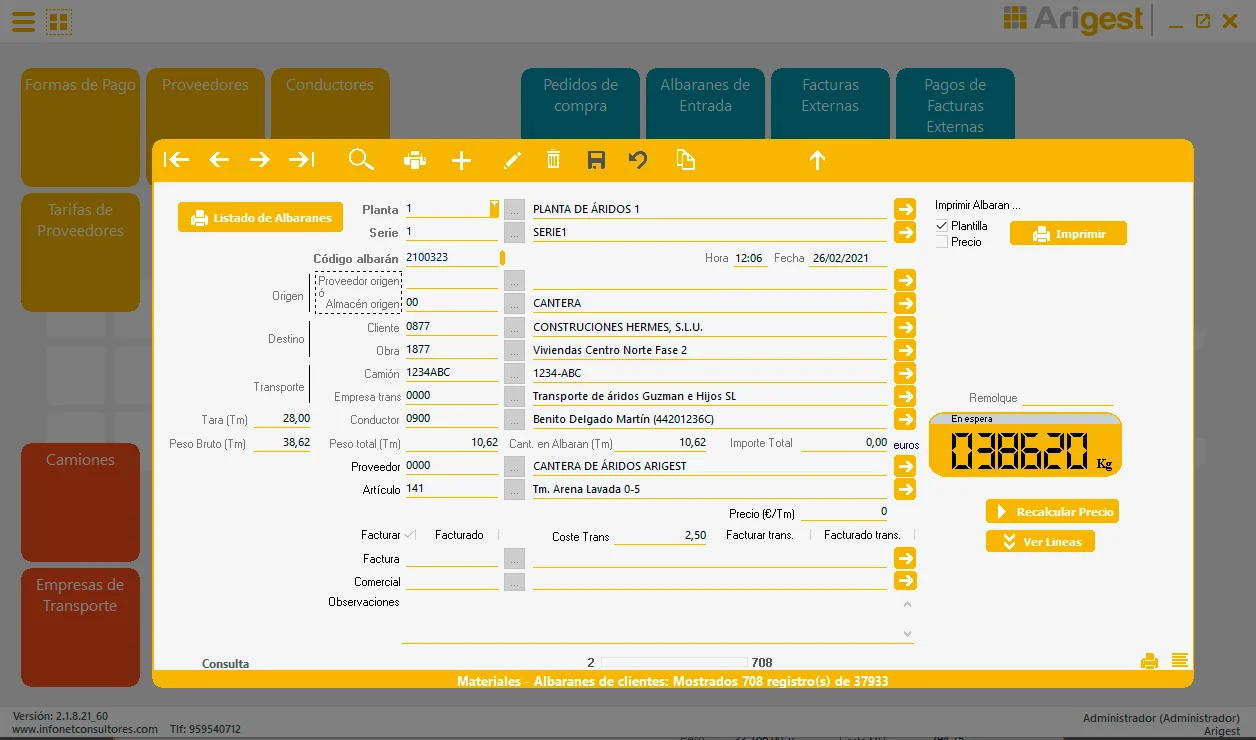
Arigest is the software installed on a computer connected to the quarry's truck weighbridge: it receives the tonnage through the RS‑232 serial port and generates the delivery note with that weight.
Connectivity
The weighbridge weight goes straight onto the delivery note
The gross weight comes directly from the weighbridge the lorries drive over. The delivery note comes out with the tare, gross weight and total weight, the lorry, the driver, the customer and the site.
- Computer: with a free serial port. The port is chosen in General Parameters (COM1 by default).
- Weighing equipment: the Sorribes S‑400, configured to send the weight continuously.
- Cable: serial, with the female end to the PC's RS‑232 port and the male end to the weighing equipment.
Operating modes
Four ways of working with the weighbridge
Depending on where the invoicing office is:
Mode 1 · From the weighbridge
The PC is connected to the weighbridge and receives the weight continuously. Arigest is used at the plant itself and the user decides which weight goes on the delivery note once it settles.
Mode 2 · With a communication module
The weighbridge keeps working as usual. A capture module stores the weighings in the background, and Arigest imports the day's delivery notes whenever you want.
Mode 3 · From a file
For when Arigest is at the office and the weighbridge is elsewhere: the delivery notes are saved to a text file and imported at the office.
Mode 4 · Plant and office
Delivery notes and new records are created at the plant; invoicing and pricing at the office. New lorries, customers and companies are added automatically on import.
And then
From delivery note to invoice
Once the delivery notes are in, Arigest invoices them with or without delivery notes attached and links bank transactions. If you also need to issue Spain's transport control document, the weighbridge ticket becomes a DeCA.
Frequently asked questions
What we are asked most
Any other questions? Call us on +34 959 54 07 12.
Which weighbridge does it work with?
It is designed to work with the Sorribes S‑400, configured to send the weight continuously through its serial port.
How is the computer connected to the weighbridge?
Through the PC's RS‑232 serial port, with a serial cable: the female end to the PC and the male end to the weighing equipment. The port is chosen in General Parameters (COM1 by default).
What if the office is far from the weighbridge?
Arigest has 4 operating modes depending on where the invoicing office is: from the weighbridge itself, with a communication module, from a file, or with delivery notes at the plant and invoicing at the office.
And the transport control document (DeCA)?
For quarries and gravel pits in Spain, the weighbridge ticket can be turned into a control document with DeCA.
What if I weigh lorries from other sectors?
Arigest is designed for quarries and aggregates plants. If you also weigh recycling, scrap metal, biomass or bulk goods, take a look at CargoGest, which grew out of Arigest's experience.
More from Arigest
Delivery notes and invoicing
Automatic delivery notes, invoices with or without delivery notes and linked bank transactions.
Quarry management
Customers, suppliers, haulage, vehicles, spare parts, consumption, incidents and carriage charges.
Priced delivery note
What priced and unpriced delivery notes are, and how they are priced at the office.
Manage your aggregate quarries with Arigest
Ask us for information and we will show you Arigest with the day-to-day running of your plant.